-1.png?width=100&height=34&name=Group%20742%20(1)-1.png)
How does rolling out Vaults impact my existing Deals and Deal Rooms?
When we introduced Vaults, we migrated your existing Deal Rooms to Vaults.
In plain English: we reorganized things behind the scenes so your files now live in Vaults — with the same files and the same lender access as before.
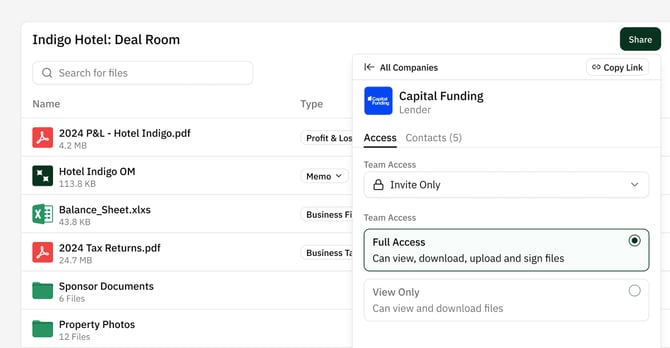
Nothing was lost and you don’t need to take action for your existing lenders. As far as you're concerned, you can now leverage a ton of new features to improve your File Sharing experience with the Lenders on your Deal: you can now:
- Create Folders to organize files uniquely in each Vault
- Edit Lender's access permissions with settings like Public Link (so they can access Files without having to login, just like Dropbox 😉)
- Create new Private Vaults to share more sensitive materials with individual Lenders
Did anything change with my existing files or lender access?
No.
- All files that were previously in your Deal Room are now in a Deal Room Vault
- Each lender still has access to the exact same files they did before
- No new lenders were granted access to Files, and no existing access was removed
- No links were sent to Lenders on your deals
If a lender could see a file before, they can still see it now.
Why do I see Vaults instead of a Deal Room?
Vaults replace Deal Rooms with a more flexible way to share files on a deal.
Previously, every deal had a single Deal Room. You probably only uploaded Files that you were comfortable sharing with all lenders, and may have occasionally set file‑by‑file restrictions to limit access to an individual Lender.
Vaults make this much simpler by letting you create multiple Vaults on a deal — each with its own files, organization, and access.
What does this look like for most deals?
For most deals, there is effectively no change. If all of the files on your Deal were shared as “Any lender on this deal”, you now have One Vault called Deal Room with the same files as before, shared with the same lenders as before.
You can think of this as your Deal Room — just upgraded with the ability to edit individual Lenders permissions.
Why do some deals have multiple Vaults?
If you previously used file‑level restrictions (for example, sharing certain documents with only one lender), we automatically created separate Vaults to preserve that access.
Each lender who previously had access to private files now has their own Vault containing only the files they were allowed to see before. This gives you clearer visibility into who has access to what.
Do my old Deal Room links still work?
Yes — this is important. Any lender who already had access using a Deal Room link can continue using that same link, you do not need to re‑email or notify lenders. However, we recommend sharing Vault Links going forward in order to take advantage of our new features like Folders, Access Settings, and more.
But again- Existing links will continue to work.
What should I do going forward?
Going forward, Vaults are the standard way to share files. When sharing new materials, send Vault links. You don’t need to replace or resend old links unless you want to change what a lender can see.
Now that you know how this change works, you can start taking advantage of what Vaults unlock — easier private sharing, clearer organization, and better control over your deal materials. Next, read up on what Vaults offer, and our recommended best practices in creating and sharing vaults.