-1.png?width=100&height=34&name=Group%20742%20(1)-1.png)
Overview
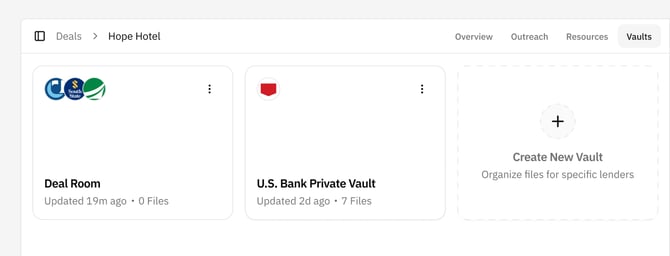
Vaults give you flexibility in how you share deal files with lenders. You can create as many Vaults as you need on a Deal, organize each one differently, and decide exactly who gets access to each Vault. This guide outlines recommended ways to use Vaults throughout a deal lifecycle.
Add Files to the Deal Before You Need Them
As you prepare your deal, you may upload and organize files that are not ready to share yet, such as:
- Tax returns
- Bank statements
- Leases
- Supporting financial documents
Keeping these files on the Deal (but not in any Vault) makes it easy to share them quickly when a lender requests additional information.
Use the Deal Room Vault for Initial Sharing
Every Deal includes an auto‑created Deal Room Vault. There is nothing special about this Vault—you can rename it or replace it entirely—but it gives you a fast way to share the core files you want all lenders to see when launching a deal.
Most teams use the Deal Room to share:- Underwriting materials prepared for launch
- Offering Memorandums or Memos
- Rent rolls or property summaries
- Any documents relevant to all lenders at the start of the process
Because the Deal Room is created automatically, you can share files externally without setting up anything new.
Use Different Vaults for Different Types of Lenders
Some teams prefer to organize Vaults based on lender type or marketing strategy. For example, you might:
- Share one memo and package with large banks
- Share a different memo or set of materials with credit unions
- Maintain separate Vaults for bridge lenders or debt funds
Each Vault can have its own files, messaging, and folder structure, giving you full control over how your deal is presented.
Create Private Vaults When Lenders Request More Materials
As lenders begin reviewing the deal, some will request additional underwriting documents. You can create a new Vault at that moment and control what that lender can see.
Typical flow:
- Create a new Vault for that lender.
- Add only the files they requested.
- Share the Vault with that lender and remove them from the Deal Room if needed.
In upcoming releases, you will be able to clone an existing Vault and move a lender into the new one automatically; for now, you can create the Vault manually and adjust their access.
Additional Notes
- You can create Vaults at any time, before or after launching a deal.
- No files appear in a Vault unless you intentionally add them.
- Each Vault has its own folder structure and access controls.
- You can move lenders between Vaults by changing which Vault you share with them.
These best practices can help you keep your workflow organized, share the right information with the right lenders, and control the progression from initial outreach through closing.