-1.png?width=100&height=34&name=Group%20742%20(1)-1.png)
Overview
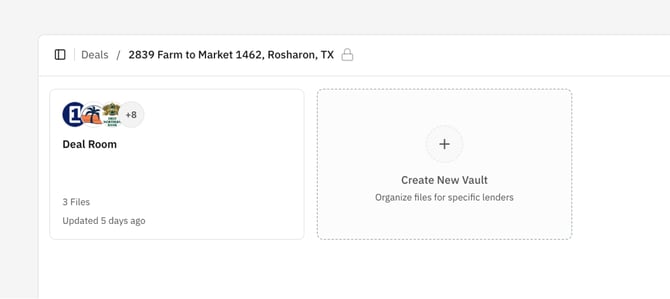
A Vault is a shared space on a Deal that contains the files you choose to share externally. Lev automatically creates a Vault named "Deal Room" on every Deal by default, and you can create additional Vaults to control which files each recipient can access. You can learn more about when we recommend creating new Vaults in our article on Best Practices for Creating and Sharing Vaults.
Create a New Vault
Create a Vault when you need to share a different set of files with a specific lender or group.
- Open the Deal.
- Go to Vaults.
- Click the Create New Vault card.
- Give the Vault a Name and click save.
After creation, the Vault appears in the Deal’s Vault list. You can now add and organize Files in the Vault, and configure the share settings before sharing.
The Default "Deal Room" Vault
Every Deal has a default Vault called "Deal Room" for you to add basic Files like a Memo to share with all Lenders when you launch your Deal. This way you can share files quickly and easily without ever having to create a Vault.
But it is totally up to you if you want to use the Deal Room or not. There is nothing unique about this Vault compared to any Vault you create on your own, and you can rename this Vault at any time. For a very low-touch and low-maintenance workflow, you can use the Deal Room as the single place to share Files with every Lender on your deal, without ever creating additional Vaults. You could also choose to create different Vaults for different types of Lenders (like Large Banks vs Credit Unions) to share unique documents with different groups — it is totally up to you! We've outlined some Best Practices for Creating and Sharing Vaults to help you get started.