-1.png?width=100&height=34&name=Group%20742%20(1)-1.png)
If a lender contact doesn't get back to you after sending them your deal, or your initial email to them bounces, there may still be another contact at the lender who you can send the deal to.
Changing Placement Status
Step 1: Go to the Outreach tab under your deal to bring up the placement table.
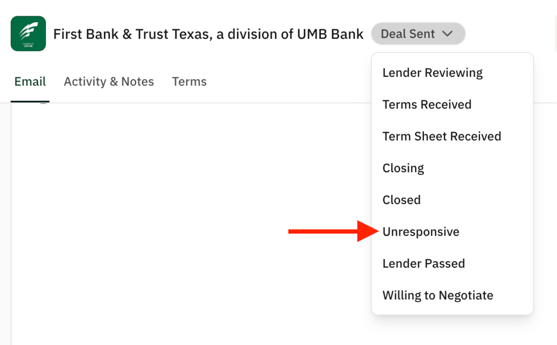
Step 2: Click on a placement's status to bring up the drop-down menu where you can manually change the status to Unresponsive.
-
- After two follow-ups without reply, the placement's status will automatically be changed to Unresponsive.
- If your initial email to the lender bounces, you will need to manually update the placement status.
Changing the Lender Contact and Relaunching Your Deal
Step 1: Once the placement status changes to Unresponsive, the platform will prompt you to Relaunch deal if there is another contact at that lender on the platform.
Step 2: Click into the placement to open the conversation, where there will be a button to Replace contact.

Step 3: Copy over your email to the previous lender contact or use one of your saved templates, and click Relaunch to send out your deal!